Edu AI Lab

AI Literacy Simulations — UX Design & Frontend Engineering

Edu AI Lab Cover Image

My Role

As UI/UX Designer, I worked quick and dirty — skipping extended discovery in favour of going straight to interface sketches. I defined the visual language for both simulations (type hierarchy, colour system, layout, component style) alongside the interaction model, iterating fast in the browser with design and code moving together. The goal was a UI that felt purposeful and credible to educators without being decorative.

As Frontend Engineer, I built both simulations in React with Vite as the dev server and build tool. All state — input values, AI output, UI controls — lives in React. Components are self-contained, styling is written as inline style objects, and Vite provides hot module replacement so design changes reflect instantly during development. The finished build is deployed as a live URL via Vercel, making the simulations accessible from any browser without any setup.

Why I Chose This Project

What began as a job interview assignment became a passion project. The brief asked for a single simulation tool; what emerged was a suite of interactive experiences designed to make abstract AI concepts tangible for educators — without requiring any technical background to use or understand.

Live React Prototype

Explore the working simulations before reading the case study.

Live prototype — Edu AI Lab
View Live Simulations → edu-ai-lab.vercel.app

Problem Statement

+

Teachers do not have the time to read entire documents to build AI literacy. Dense research papers, policy briefs, and technical explainers create a barrier — the subject matter is important, but the format is inaccessible within the realities of an educator’s working day.

Simulations offer a different path. Rather than asking teachers to read about how AI processes text, simulations let them experience it directly — adjusting inputs, observing outputs, and drawing their own conclusions. Within the education context, this approach converts passive information into active understanding without demanding prior technical knowledge.

Edu AI Lab is a suite of browser-based simulations built on this premise: that the fastest route to AI literacy for educators is not reading, but doing.

Design Approach

+

Simple interfaces with UI controls that alter AI text output

Each simulation is built around a single, legible control surface. Sliders, toggles, and dropdowns directly alter AI behaviour in real time — switching between word-for-word interpretation, analysis, and review modes — so the relationship between user input and AI output is immediate and visible. There is no abstraction layer between what the teacher adjusts and what the simulation does.

Clear table format, headers, and tooltips to reduce visual clutter

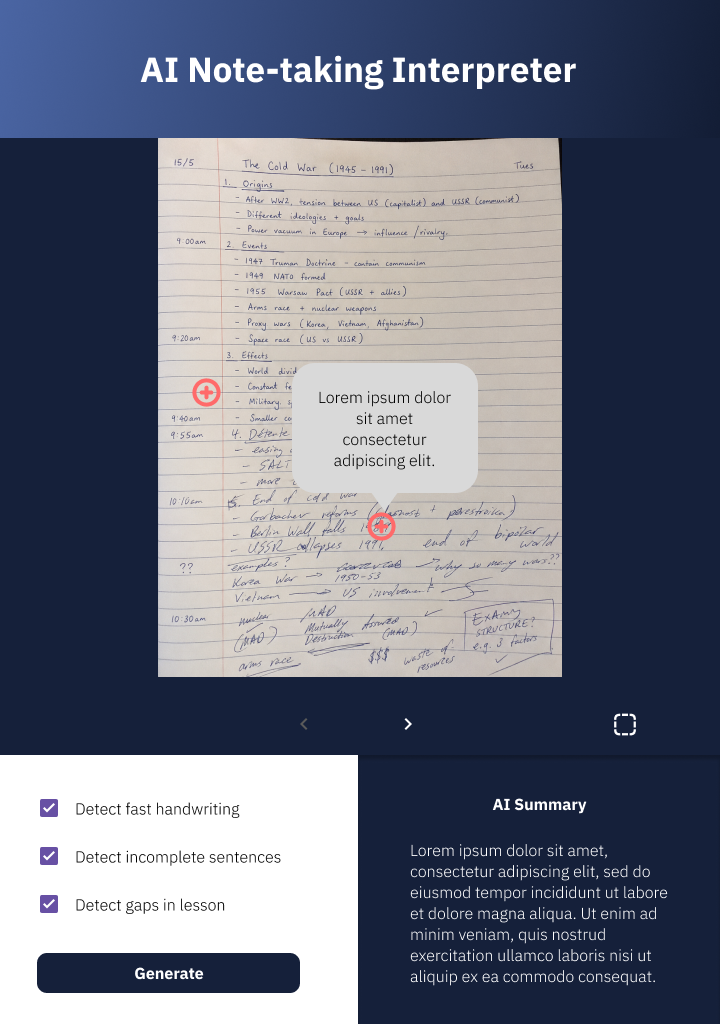
Outputs are structured as tables with clear column headers rather than unbroken prose. Tooltips surface definitions and explanations only when needed, removing the cognitive overhead of heavy explanatory text that sits on screen regardless of whether the user needs it. The goal is an interface that teaches through use, not through reading.

Wireframes

+

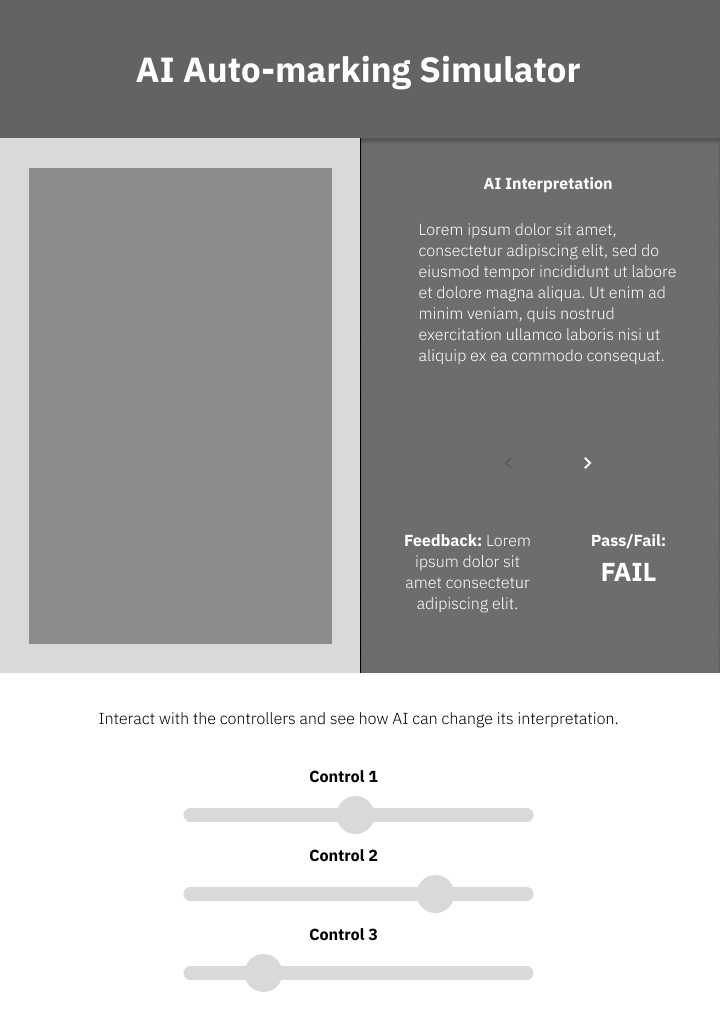
AI Auto Marker

Low-fidelity wireframe exploring the layout and control hierarchy for the auto-marking simulation.

Auto Marker — Wireframe 1

Auto Marker — Input Configuration

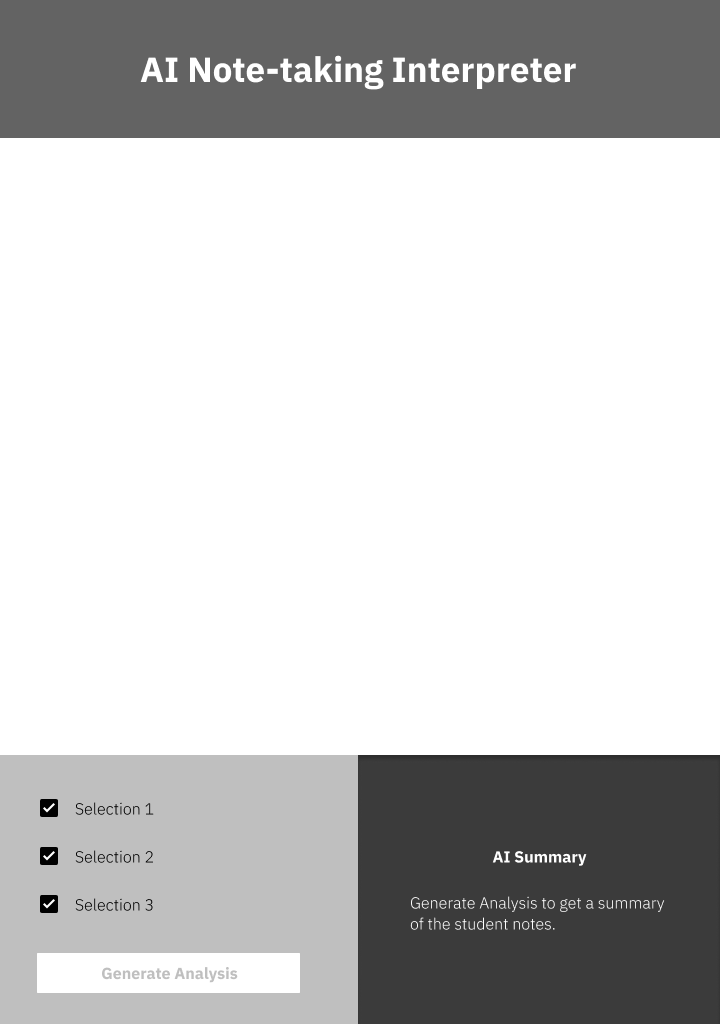
Notes Interpreter

Low-fidelity wireframe for the notes interpretation simulation.

Notes Interpreter — Wireframe 1

Notes Interpreter — Input

Pros and Cons

+

AI Auto Marker

Pros. Demonstrates AI grading behaviour concretely and interactively. Table output makes scoring logic transparent. Real-time feedback loop between teacher input and AI output builds intuition quickly.

Cons. Simplified marking criteria may not reflect the complexity of real classroom rubrics. Risk of over-reliance on AI scores without contextual judgement from the teacher.

Notes Interpreter

Pros. Mode switching (interpretation vs. analysis vs. review) gives educators a direct comparison of how framing affects AI output. Structured table output is easier to scan than a wall of AI-generated prose.

Cons. The quality of output depends heavily on input quality — educators using poorly structured notes may draw inaccurate conclusions about AI capability. Tooltip-based explanations require the user to seek context rather than having it surface proactively.

High Fidelity Screens

+

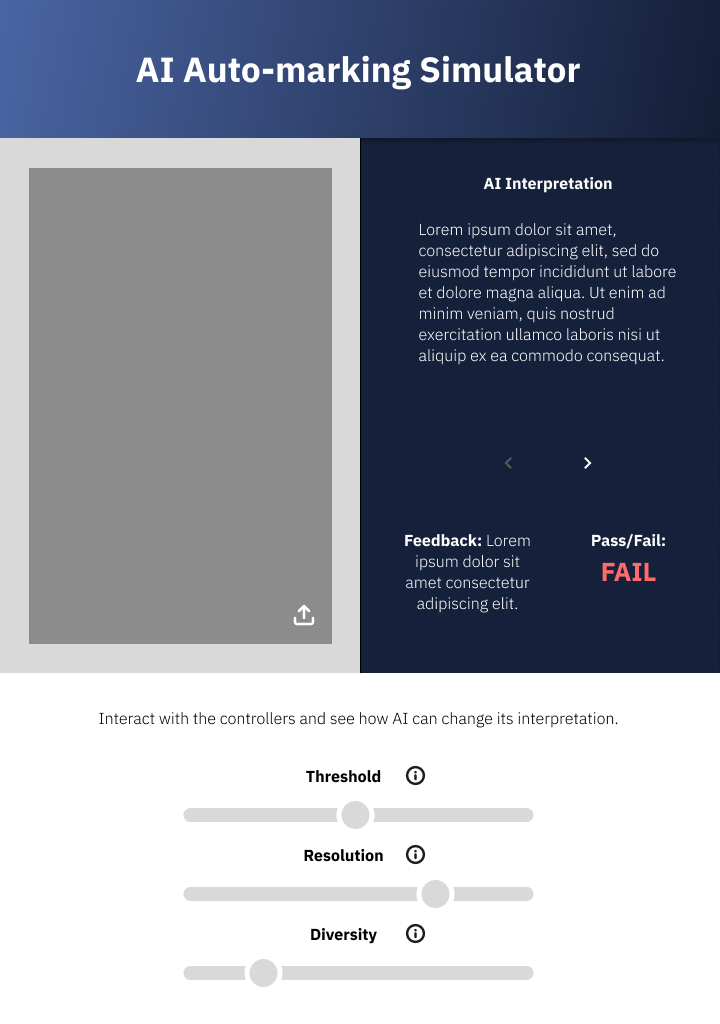
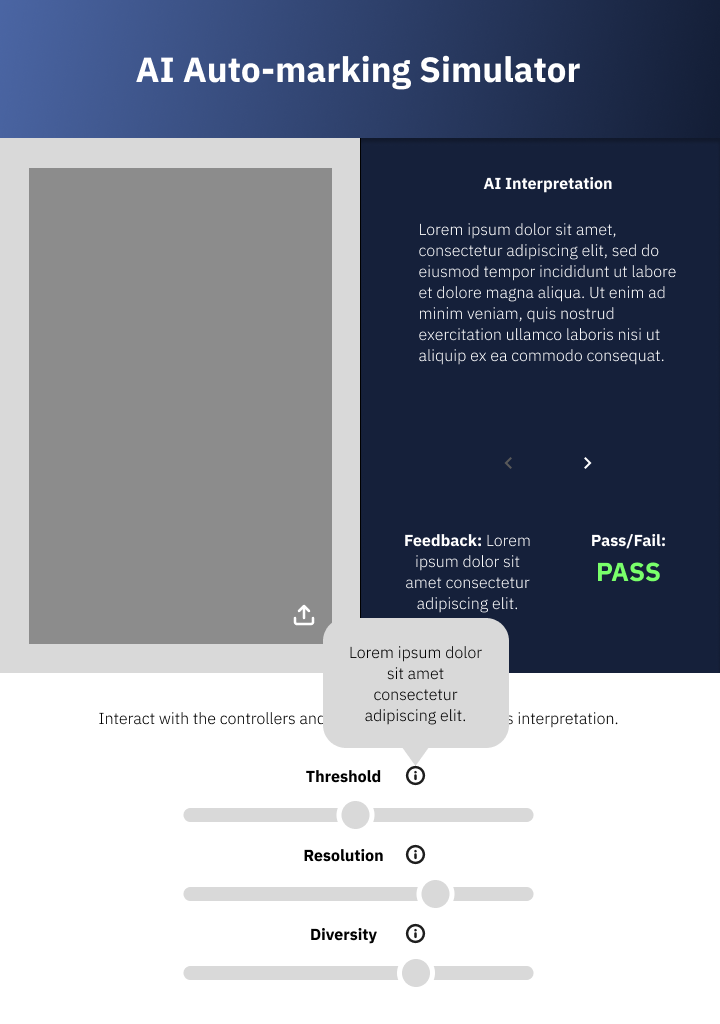
AI Auto Marker

High-fidelity screens showing the final visual design of the auto-marking simulation: the input and configuration panel, and the structured results output.

Auto Marker — High Fidelity 1

Auto Marker — Input Panel

Auto Marker — High Fidelity 2

Auto Marker — Results Output

Notes Interpreter

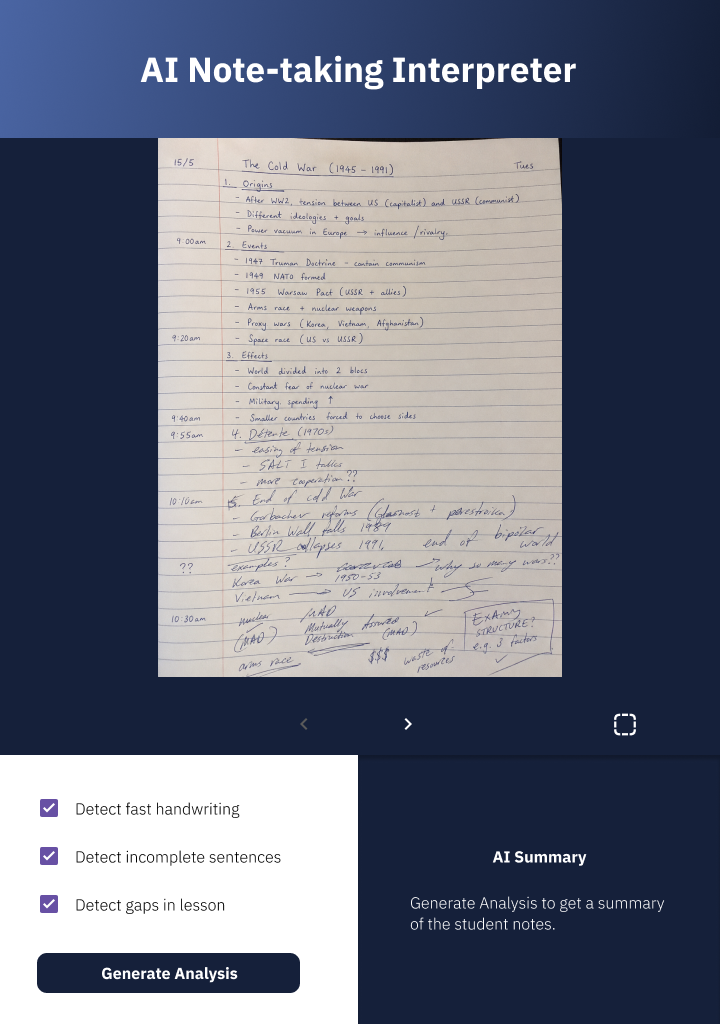
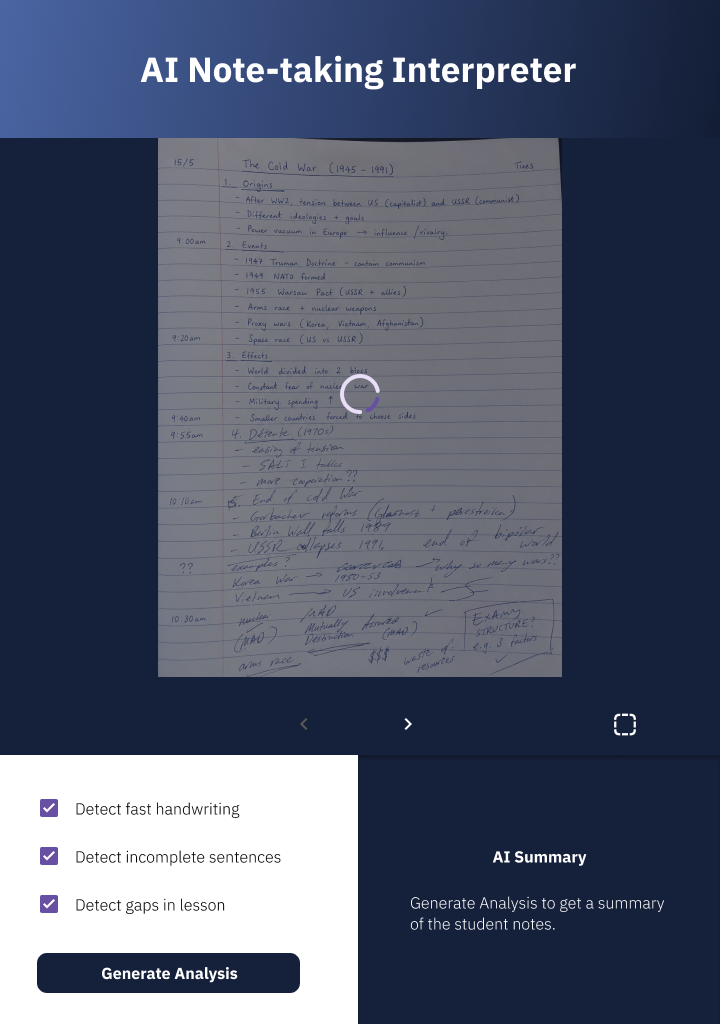
High-fidelity screens showing the final visual design of the notes interpretation simulation across its three primary states.

Notes Interpreter — High Fidelity 1

Notes Interpreter — Input

Notes Interpreter — High Fidelity 2

Notes Interpreter — Loading Analysis

Notes Interpreter — High Fidelity 3

Notes Interpreter — Structured Output

Live React Prototype

The simulations are deployed as a React web application and accessible at the link below. Both tools — the AI Auto Marker and the Notes Interpreter — are live and interactive.

Edu AI Lab edu-ai-lab.vercel.app
×